AI Symptom Checker: How It Works, How Accurate It Is, and When to Use One
An AI symptom checker is an online tool that reads your symptoms in plain English and suggests possible causes, how urgent they may be, and what to do next — see a doctor, visit urgent care, or call 911. According to Wikipedia, these tools have existed in various forms since the early 2000s, long before modern machine learning made them conversational. It gives you information and a starting point, not a diagnosis.
Roughly 80% of U.S. adults already search their symptoms online, and modern AI-powered tools aim to make that safer and clearer. This guide explains how a symptom checker app works, how accurate the technology really is, the best free options, and — most importantly — when you should skip the app and get emergency help.
This article is not medical advice and does not replace a doctor. No AI symptom checker can diagnose you or prescribe treatment. If you are experiencing a medical emergency, call 911 immediately. If you are in emotional distress or having thoughts of suicide, call or text 988, the Suicide & Crisis Lifeline, right away.

What Is an AI Symptom Checker?
A symptom checker is a piece of software — usually a website, app, or health-assistant chatbot — that asks you structured or free-text questions about what you’re feeling and returns a list of possible explanations along with a suggested next step. It does not order lab tests, look at your body, or listen to your heart; it works entirely from what you type or say.
A plain-English definition
In plain terms, an AI symptom checker asks about your symptoms, estimates possible causes, and tells you how urgent the situation might be — self-care, a virtual visit, urgent care, or the emergency room. It does not put a name on your condition and does not write a prescription. Several tools dominate this category in the U.S. market: Ubie, Isabel, Symptomate, WebMD, Buoy, Ada, Mayo Clinic’s checker, and the UK’s NHS 111 service. Isabel has been running since 2001 — more than two decades of continuous use inside hospital systems — while newer entrants like Ubie and Buoy have layered conversational AI on top of the same basic idea.
- Ubie — a fast, conversational intake tool built for U.S. primary care
- Isabel — free-text symptom entry used inside hospitals since 2001
- Symptomate — a regulated triage engine built by Infermedica
- WebMD’s AI symptom checker — a consumer-facing conversational tool
- Buoy Health — a chat-style checker studied in a JAMA-linked cohort
- Mayo Clinic and NHS 111 — health-system-run checkers tied to care networks
What it is not
An AI symptom checker is not a diagnosis, not a prescription, and not a substitute for a licensed clinician. It is best understood as an informed starting point — something that helps you decide what to do next and gives you language to use when you do see a doctor. None of the tools above are built or licensed to handle emergencies; that distinction matters enough that it gets its own section below.
How Does an AI Symptom Checker Work?
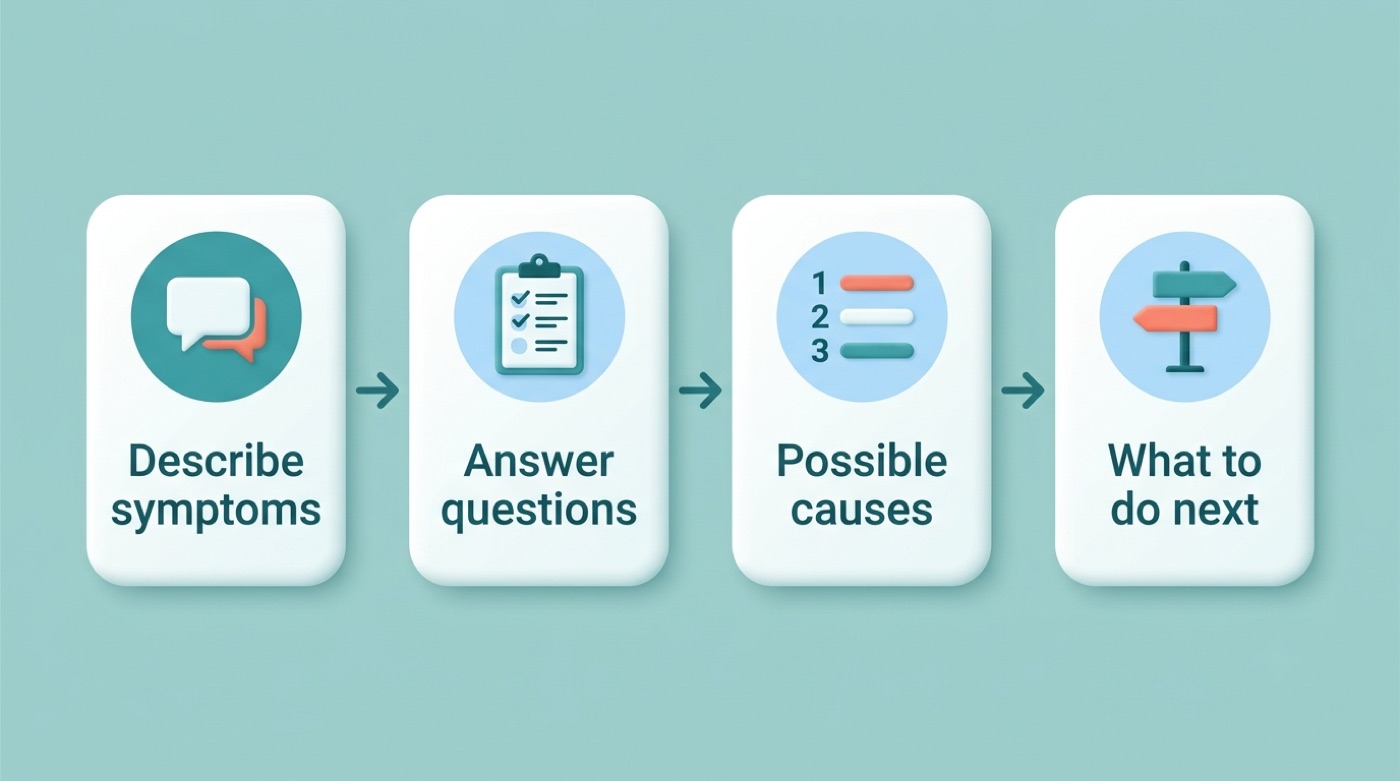
Every symptom checker by AI follows roughly the same pipeline, whether it’s built on classic decision trees or a large language model layered on top of a medical knowledge base. Understanding the mechanics helps explain both why these tools are useful and why they sometimes get things wrong.
Step 1–2: Understanding your symptoms (NLP + follow-up questions)
Natural language processing reads your description in your own words — “sharp pain under my ribs that started this morning” — and maps it to a structured symptom. From there, the system asks follow-up questions to build what clinicians call the history of present illness (HPI): when it started, how severe it is, what makes it better or worse, and what other symptoms are present. This step is where an AI-assisted symptom checker earns its name — it’s genuinely reading and interpreting language, not just matching keywords from a dropdown menu.
Step 3–4: The differential and triage
Once the intake is complete, machine learning algorithms compare your answers against patterns learned from large sets of clinical data and produce a differential diagnosis — a ranked list of possible explanations, ordered roughly by likelihood and urgency. The tool then performs triage, or care routing: it recommends self-care, a telehealth visit, an in-person appointment, urgent care, or the emergency room. This last step carries real weight nationally — recent research classifies close to 29% of U.S. emergency-room visits as avoidable or potentially avoidable, better suited to a lower level of care, which is exactly the gap a well-built digital triage tool is designed to close.
| Stage | What happens | Output |
|---|---|---|
| 1. Intake | NLP parses your free-text description | Structured symptom list |
| 2. History | Follow-up questions build the HPI | Duration, severity, risk factors |
| 3. Differential | ML ranks possible causes | Differential diagnosis list |
| 4. Triage | System matches urgency to care level | Self-care, virtual visit, urgent care, or ER/911 |
How Accurate Are AI Symptom Checkers?
This is the question that matters most, and the honest answer sits between marketing claims and real-world data. Diagnostic accuracy for any symptom checker app depends heavily on how you measure it — and on whether the condition being checked is common or rare.
What the numbers say
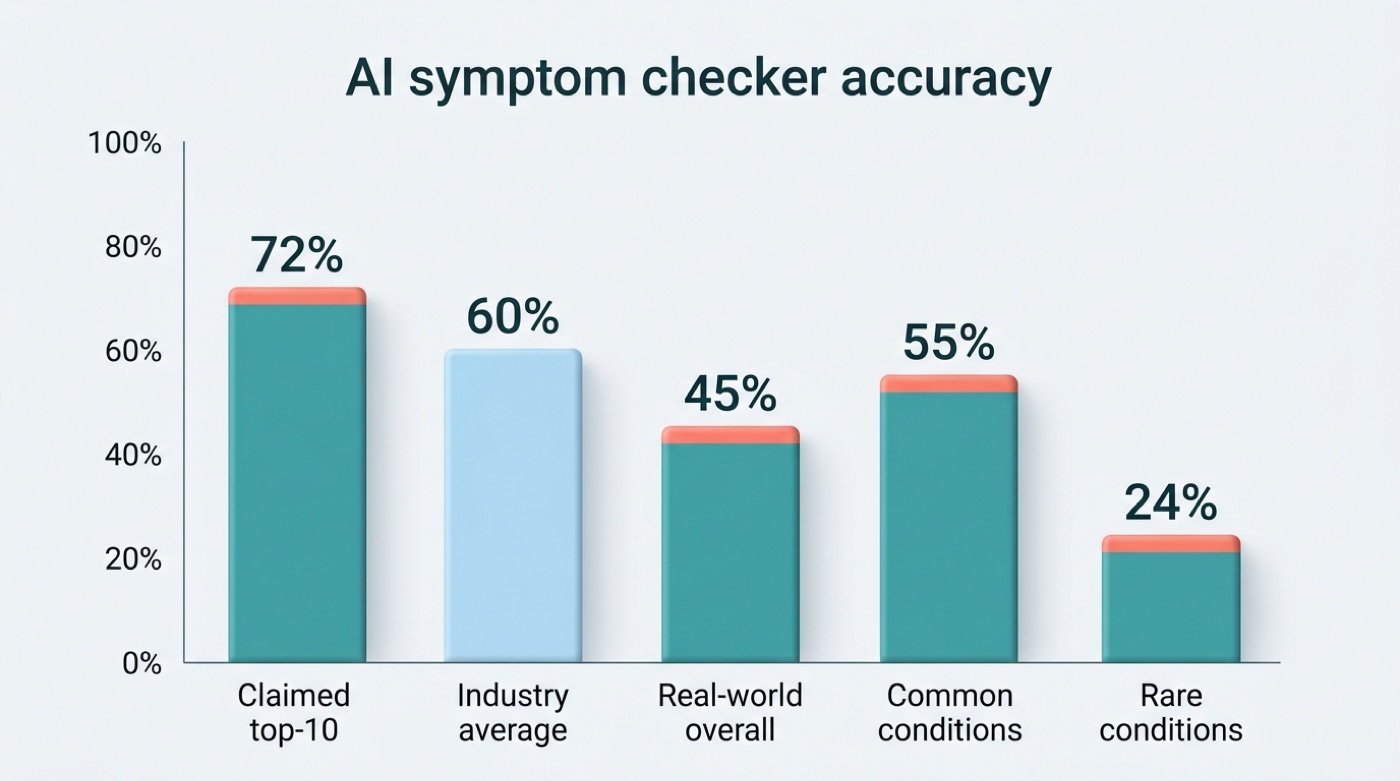
Companies advertise their best-case numbers. Ubie, for example, reports a top-10 hit accuracy of roughly 71.6% — meaning the correct condition appeared somewhere in the top 10 suggestions — against an industry average closer to 60% by the same measure. Independent research tells a more modest story. A three-year study published in JMIR and indexed on PubMed Central tracked real-world use of a symptom checker and found an overall accuracy of just 45.1% (172 of 381 cases), with no meaningful improvement across three years (44.3%, 44.4%, 47.7% — statistically flat, P=.85).
Why accuracy varies
Accuracy is not one number — it splits sharply by how common the condition is. The same study found accuracy of 55.3% for common conditions versus only 24.2% for rare ones, and 53.7% for typical presentations versus 14.5% for atypical ones. The takeaway is straightforward: a symptom checker online is a reasonably useful guide for everyday complaints and considerably weaker for anything unusual — which is precisely the situation where a doctor’s judgment matters most.
| Accuracy measure | Result |
|---|---|
| Claimed top-10 hit accuracy (industry-leading tool) | ~71.6% |
| Claimed industry average (top-10 hit) | ~60% |
| Independent real-world overall accuracy (3-year study) | 45.1% |
| Accuracy trend over 3 years | Flat (44.3% → 44.4% → 47.7%, not significant) |
| Common conditions | 55.3% |
| Rare conditions | 24.2% |
| Typical presentations | 53.7% |
| Atypical presentations | 14.5% |
Best Free AI Symptom Checkers Compared
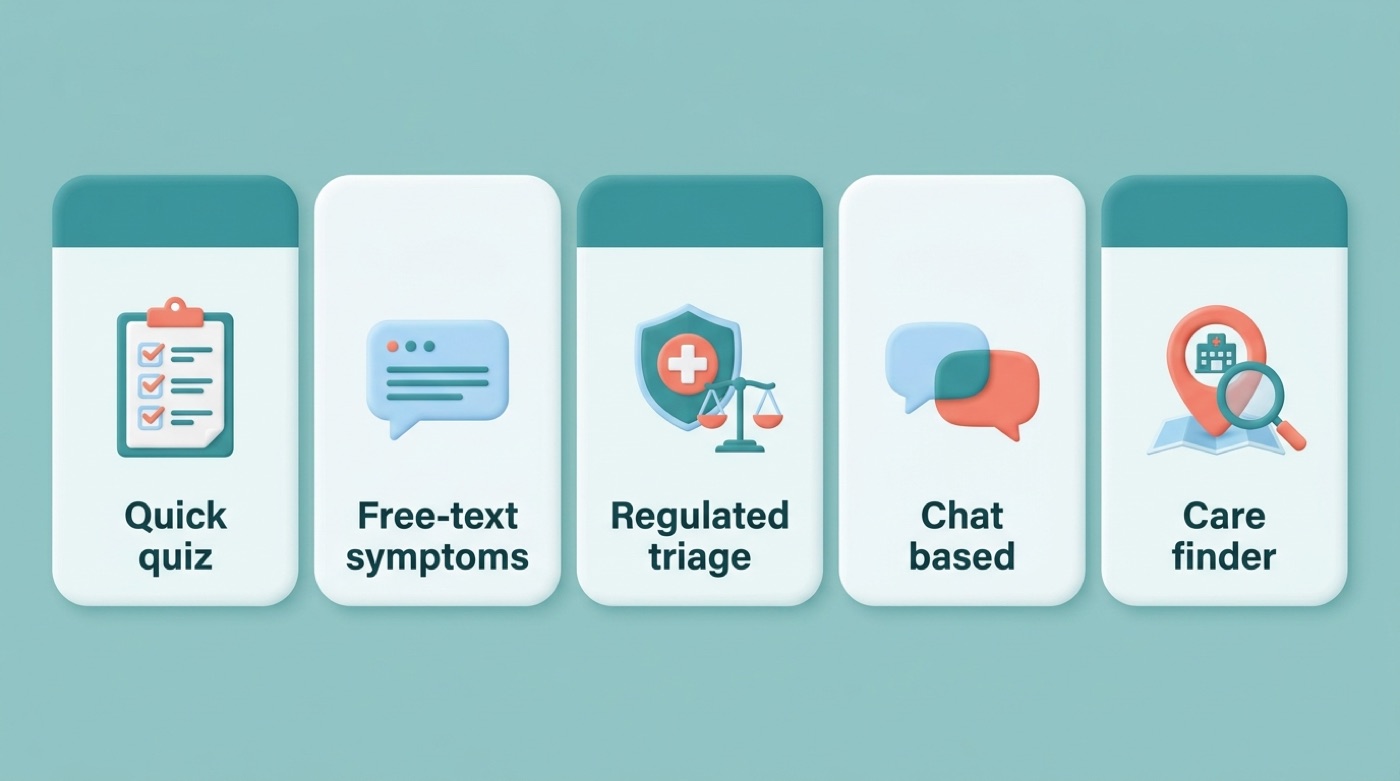
No single free AI symptom checker wins on every dimension — speed, depth, regulatory status, and privacy trade off against each other. Here’s how the major U.S.-facing tools compare in approach.
Ubie runs a fast, roughly three-minute conversational intake and is free to use, with connections into more than 1,700 U.S. healthcare providers for follow-up care.
Isabel accepts symptoms typed in free-form language rather than picked from a list, is tuned to catch both common and rare presentations, and is available in 14 languages — a legacy of its two decades inside hospital systems.
Symptomate, built by Infermedica, is trained on more than 27 million completed interviews and is registered as a Class IIb regulated medical device, with HIPAA and GDPR compliance built in; it can be used anonymously without an account.
Docus combines an AI intake with access to a network of more than 350 doctors and holds SOC 2, HIPAA, and GDPR certifications.
Buoy Health uses a chat-style interface and was evaluated in a JAMA-linked cohort study of more than 150,000 interactions, which found it measurably reduced people’s uncertainty about what level of care they needed.
WebMD’s AI symptom checker takes a conversational, consumer-friendly approach aimed at people who are already used to WebMD’s health content.
| Tool | Approach | Free? | Notable credential | Best for |
|---|---|---|---|---|
| Ubie | Fast conversational intake | Yes | 1,700+ provider network | Quick triage, U.S. users |
| Isabel | Free-text, common + rare | Yes (basic) | 20+ years in hospitals, 14 languages | Complex or unusual symptoms |
| Symptomate | Regulated question flow | Yes | Class IIb medical device, HIPAA/GDPR | Anonymous, clinically rigorous checks |
| Docus | AI + human doctor network | Yes (basic) | SOC 2, HIPAA, GDPR | Wanting a doctor follow-up |
| Buoy Health | Chat-style interview | Yes | JAMA-linked study, 150,000+ interactions | Reducing care-level uncertainty |
| WebMD | Conversational, consumer | Yes | Large existing health content base | Familiar, casual use |
All of these are useful starting points, but every one of them carries the same limit described above: real-world accuracy sits well below marketing headlines, and none of them replaces a clinical exam.
When to Use an AI Symptom Checker — and When to Call 911
Knowing when a digital triage tool is appropriate — and when it is dangerously inadequate — is the single most important thing to take from this guide.
Good uses (non-urgent)
An AI symptom checker online is well suited to situations where you have time to think. Reasonable uses include:
- Making sense of a confusing but non-urgent symptom, like a nagging cough or mild joint pain
- Deciding whether a symptom warrants a same-week appointment, a virtual visit, or watchful waiting
- Preparing focused questions before a doctor’s visit
- Better understanding a diagnosis you’ve already received from a clinician
Red flags — do not use an app, call 911 now
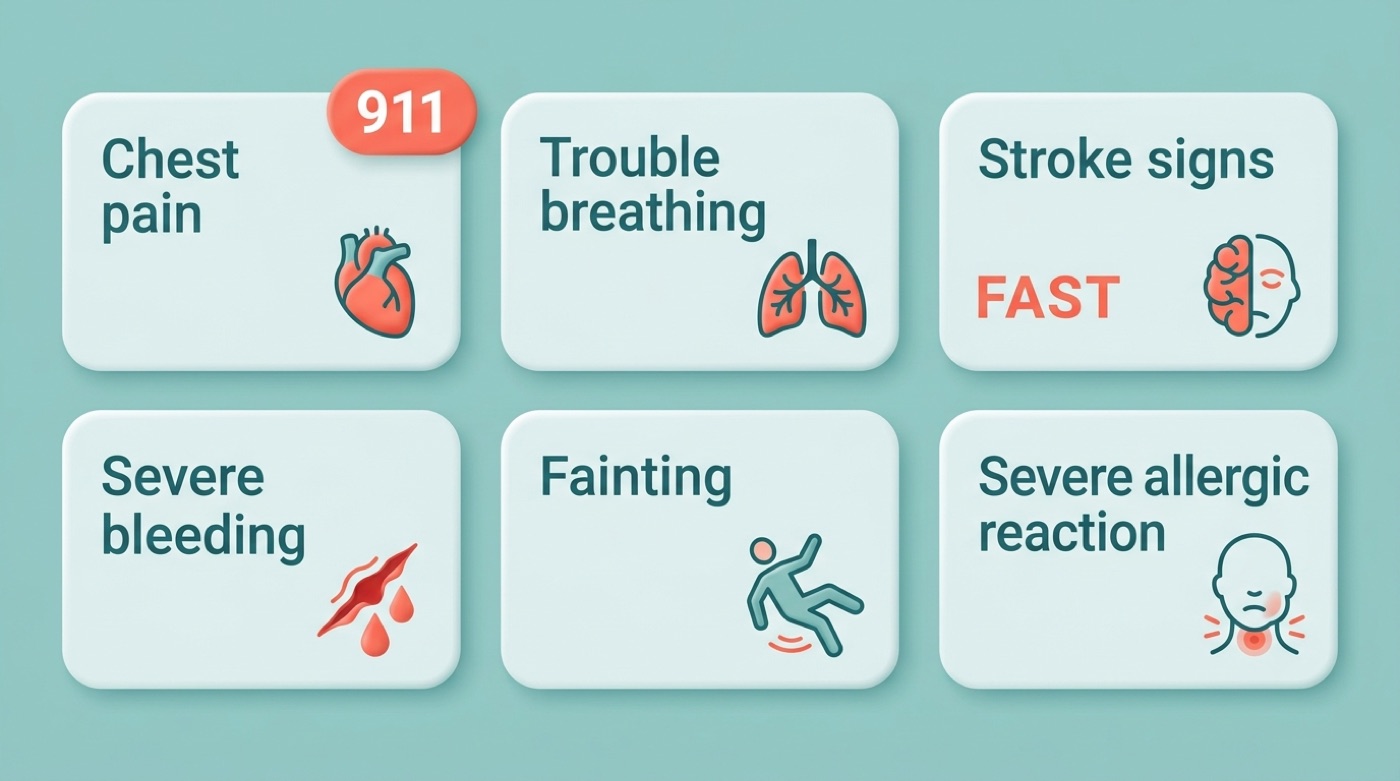
Some symptoms should never be typed into a chatbot. If you or someone near you has any of the following, call 911 immediately instead of opening an app:
- Chest pain or pressure, especially spreading to the arm, jaw, or back
- Trouble breathing or shortness of breath at rest
- Sudden signs of stroke — use FAST: Face drooping, Arm weakness, Speech difficulty, Time to call
- Severe or uncontrolled bleeding
- A sudden, extremely severe headache unlike any before
- Fainting or loss of consciousness
- A severe allergic reaction with swelling or difficulty breathing
For an official, plain-language list of emergency warning signs, MedlinePlus — a service of the U.S. National Library of Medicine — is a reliable government reference to bookmark. If the crisis is emotional rather than physical — thoughts of suicide or self-harm, or a mental-health emergency — call or text 988, the Suicide & Crisis Lifeline, rather than searching for a symptom checker app.
Are AI Symptom Checkers Safe and Private?
Privacy and safety are two separate questions, and both deserve a direct answer before you type anything personal into a health app.
Most established tools in this space are built to comply with the Health Insurance Portability and Accountability Act (HIPAA) if they operate in the U.S., and several — including Symptomate and Docus — also hold SOC 2 or GDPR certifications for handling data from international users. Many allow anonymous use without creating an account or entering payment information at all. As the U.S. Department of Health and Human Services puts it:
The HIPAA Privacy Rule establishes national standards to protect individuals’ medical records and other individually identifiable health information.
U.S. Department of Health and Human Services
Compliance, however, is not a guarantee of quality. Machine learning algorithms trained on historical medical data can inherit the biases present in that data, and — as the accuracy numbers above show — they perform noticeably worse on rare or atypical cases. There is also a real risk of over-relying on a confident-sounding result. Before trusting any AI health assistant with personal details, it’s worth checking a few basics:
- Does it state HIPAA compliance (for U.S. tools) or GDPR/SOC 2 (for international ones)?
- Can you use it anonymously, without creating an account or entering payment details?
- Does it have a clear, readable privacy policy explaining what happens to your data?
- Does it clearly say it is not a diagnosis and direct you to emergency services when needed?
Treat every result as a prompt to think further, not a final answer.

How to Get the Most Out of a Symptom Checker
Research on real-world use is encouraging when the tool is used correctly: one JMIR survey found 76.3% of users turned to a symptom checker specifically to understand their symptoms better, 84.1% found the experience useful, and 91.4% said they would use it again. The best results come from treating the tool as preparation, not verdict.
- Write down when the symptom started and how it has changed since
- Note the severity on a simple scale (mild, moderate, severe) rather than guessing a diagnosis
- List anything that makes it better or worse, including medication already taken
- Answer every follow-up question honestly, even ones that feel unrelated
- Read the full differential list, not just the first suggestion
- Save or screenshot the result to bring to your appointment
- Book the level of care the tool suggests — or a higher one if you’re still unsure
Used this way, a free AI symptom checker becomes a genuinely useful first step: it turns a vague worry into a specific set of possibilities and questions, and it gives your doctor a head start instead of a blank slate.
Whatever the result says, it is still not a diagnosis. If symptoms worsen, don’t improve, or simply don’t feel right, contact a healthcare provider — and if any of the red-flag signs above appear at any point, stop and call 911. For a mental-health crisis, 988 is available around the clock.
Frequently Asked Questions
- How accurate are AI symptom checkers?
Accuracy varies widely by measurement method. Vendors advertise top-10 hit accuracy up to roughly 71.6%, but an independent three-year real-world study found overall accuracy closer to 45%, higher for common conditions and much lower for rare ones. Use results as a guide, not a diagnosis.
- Can AI diagnose my symptoms?
No. An AI symptom checker can suggest possible causes and an urgency level, but only a licensed doctor can diagnose you after an examination and, when needed, lab tests or imaging.
- What is the best free AI symptom checker?
It depends on your needs: Ubie offers a fast conversational intake, Isabel handles free-text entry and rare conditions well, and Symptomate is a regulated medical device built for anonymous, clinically rigorous checks. All have free basic versions, and accuracy differs between them.
- Are online symptom checkers safe to use?
For non-urgent questions, yes, as long as the service is HIPAA-compliant and you understand its limits. For emergency symptoms, no — an app should never delay a call to 911.
- Should I see a doctor after using a symptom checker?
Often, yes. Use the result to prepare specific questions for your visit. If symptoms are worsening, unclear, or concerning, contact a healthcare provider directly, and call 911 immediately for any red-flag symptom.
- Can an AI symptom checker replace a doctor?
No. It is an information and triage tool meant to complement professional medical care, not replace the judgment, examination, and diagnosis a licensed clinician provides.